Understanding Stay-at-Home Moms’ Needs for Workout App
This is an exploratory research project I conducted with an interest to understand stay-at-home moms' needs and behaviors towards mobile workout app, and to identify opportunities for improvement. A high-fidelity clickable app was designed, and remote unmoderated usability tests were conducted to evaluate the effectiveness of our design.

RESEARCH BACKGROUND
Stay-at-home moms have families to take care, lots of errands to run, they don’t have much time going to gym to do workout. How can they keep fit while running errands? The workout and fitness apps make it possible. Since stay-at-home moms usually have more exercise barriers than others, including lack of time, lack of motivation and parenting demands, our platform aims at making it easier for them to keep doing exercise regularly.
We wants to learn about how stay-at-home moms use mobile fitness apps to do workouts, including what their motivations are and what goals they try to achieve. We aim to find out what specific needs they most focus on, so that we can use these findings to design a product that meet their needs.
RESEARCH GOALS
-
What are stay-at-home moms’ notable motivations, preferences, and barriers?
-
Identify needs and opportunities to improve the current flow.
-
Observe and understand users’ current PLAN DESIGN processes.
METHODOLOGY
Duration: 4 weeks
Phases:
Phase 1: DISCOVERY -- Conducting screener survey and semi-structured interviews to identify actionable insights
Phase 2: DESIGN -- Concept design and prototyping
Phase 3: TESTING -- Remote Usability Testin
Semi-Structured Interview
1. Introduction: Let participants know why they’re in the interview, thank them for participating
2. First few question: Set participants in their experience. Be vague.
3. Core research questions: Don’t bias or lead the participant. Keep things high level. Natural and conversational
4. Final thoughts and thank you
Affinity Map using Miro (created to visualize user concerns and needs)
KEY FINDINGS
Key finding #1
Stay-home-moms usually spent around 30 minutes each
time to do workout.
Recommendation #1
Show short workout videos with duration time indicated.
The app should allow users filter videos by time duration.
Key finding #2
Participants focus more on how much calories the workout is going to consume, which part of the body the workout focuses on. They wish to be able to filter out the workouts rather than browsing the categories provided by the apps.
Recommendation #2
More filtering factors should be provided, such as Calories, Workout part, etc.
Allow users to make plans by their rules.
Key finding #3
Keeping track of the progress and achievement motivates
the participants to keep using the workout apps.
Recommendation #3
Achievements and progress help motivate users
CONCEPT DESIGN & PROTOTYPING
A clickable high-fidelity prototype for iphone apps was developed and the accessibility of the app was improved. Iterations were conducted based on Data & KPIs, and hand-off to engineering.
USABILITY TEST
Remote usability test using Look Back, 5 participants for each round
Test insights from user validations:
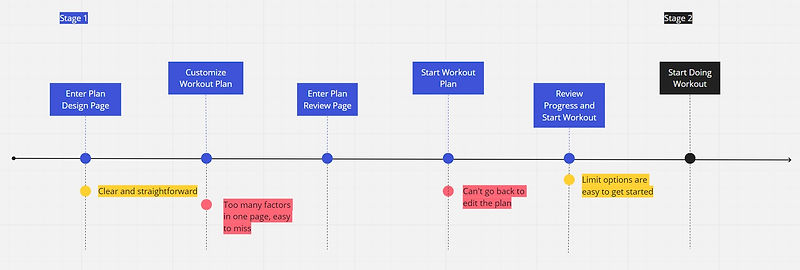
1. On the personal information page, the progress bar is confusing.
2. In general, users wished to have the navigation bar at the bottom of screen instead of on the top as menu icon.
Iteration:
1. Improved the design accordingly and iterated the test based on KPI - Decrease Time on task.
2. The average completion time was decreased by 25%
DISCUSSION & CONCLUSION
Solution & Impact Overview
-
Show short videos with crucial information indicated.
-
Allowed the users to design their plans by their rules.
-
Users were operating smoothly and the completion time were decreased significantly.
Next Step:
-
Extend to other stages of user process
-
Increase sample size
-
A/B testing